Channel partner management for real estate builders
Channel partners bring a large share of buyers, but their conversations live in their own phones and WhatsApp groups. With Augnix, every partner works inside your CRM: their own team logins, your approved tours and material, and every buyer they bring in one place your team can see.
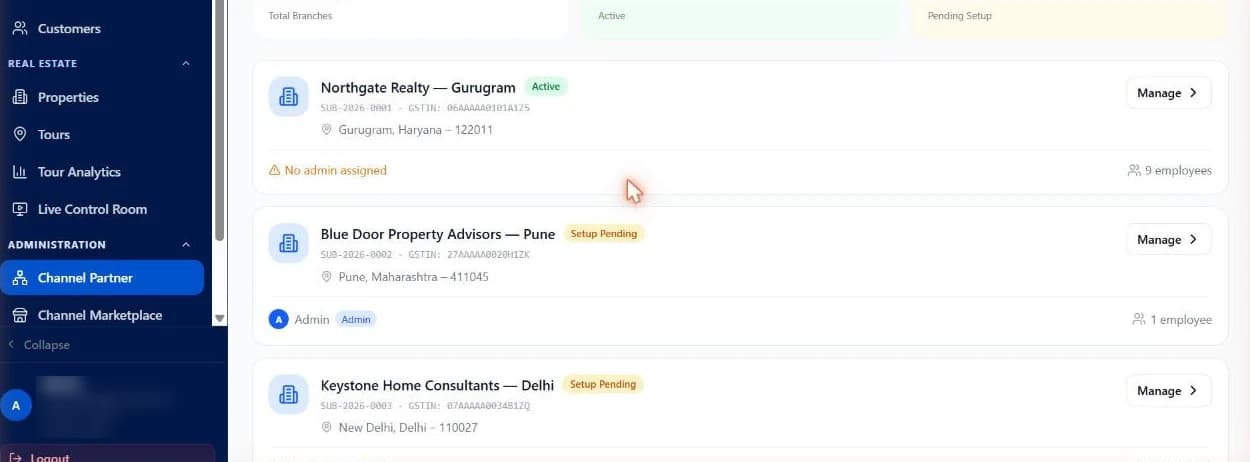
Partners on WhatsApp groups vs partners in Augnix
| WhatsApp groups and spreadsheets | Augnix | |
|---|---|---|
| Partner onboarding | A contact in someone’s phone | Each partner set up with code, GST and office details |
| Partner team access | Shared forwards | A partner admin and a login for each team member |
| Material buyers receive | Whatever was forwarded last | Your approved tour links, photos and brochures |
| Where partner buyers live | In the partner’s phone | In your CRM, next to your direct buyers |
| Seeing the home | A PDF | The same guided virtual tour your team sends |
What you get
Onboard every partner
Add each channel partner with their code, GST and office details.
A partner admin and team logins
Give each partner an admin and their own team members, each with a login.
Share approved tours and material
Partners send buyers the same approved tour links, photos and brochures your team uses.
One CRM for direct and partner buyers
Every buyer conversation sits in the same CRM, so nothing lives only in a partner’s phone.
Getting partners started
Step 1
Add your partners
We load your channel partners and their offices into the CRM.
Step 2
Invite their teams
Each partner admin adds their team, and everyone gets a login.
Step 3
Share the project
Partners send approved tours and material to their buyers, and every buyer lands in your CRM.
Why channel partner leads go missing
Partners work their own lists in their own phones. Builders see a buyer only when a visit is booked, if at all, and nobody knows which partner brought which buyer or what the buyer was told.
Putting partners inside the same CRM as your own team fixes that: one record per buyer, one approved story about the project, and a clear view of who brought whom.
Frequently asked questions
Can our channel partners use Augnix?
Yes. Each channel partner is set up in the CRM with their details, a partner admin and team logins, and partners share the same approved tour links and material with their buyers.
What can partners send to buyers?
The approved tour links, photos and brochures your team uses, including guided virtual tours of the project.
Where do partner buyers go?
Into your CRM, in the same place as buyers who came to you directly, so nothing lives only in a partner’s phone.
Who sets it up?
Our team loads your partners and offices into the CRM and helps each partner admin invite their team.
Bring your channel partners into one CRM
Leave your mobile number. Our team replies on WhatsApp or calls within one business day.
Prefer to talk now? Chat with us on WhatsApp